
Three to seven QC photos, and nobody is going to read them for you
The photographs exist, they are free, they are better than most people expect, and they are the entire evidence base you will ever have for that item. This page is about finding them, keeping them, and looking at them in an order that catches things.
What is worth photographing changes completely between a jacket and a camera.
Where the photographs sit
The official summary of the service puts your confirmation in the middle step

When the operator describes its own service in three steps, the middle one reads QC Confirm and Global Shipping. Confirming the quality check is not an optional extra tacked onto the end. It is written into the step that releases your goods for the international leg, in the same breath as the shipping itself.
That is the theory. In practice nothing blocks. The parcel does not sit and wait for you to click confirm on each photograph, and the step will complete around you if you are not paying attention.
Which makes the gap between those two facts the whole subject of this page. The system treats your confirmation as part of the flow. The flow does not stop to collect it.
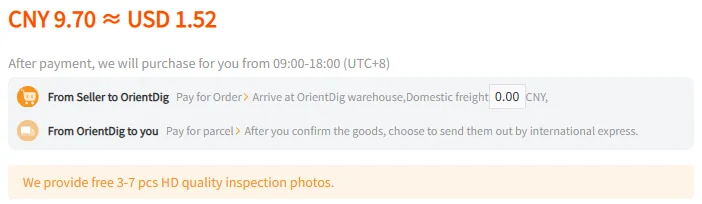
What the product page promises, in its own words
The orange bar at the bottom is the promise: free high-definition inspection photographs, three to seven of them. It is a real number of real images and it costs nothing, which is more than several competitors offer.
The row above it is the one people skip, and it is the more important of the two. After you confirm the goods, it says, choose to send them out by international express. Your confirmation is written in as the thing that comes before the expensive leg.
Put the two together and the photographs stop looking like a courtesy. They are the material you are being asked to sign against, delivered before the point where changing your mind gets costly.
The row itself: six thumbnails, a download icon and an enlarge icon

At the size they are displayed, the thumbnails are decorative. A stain that is obvious at full resolution disappears entirely at sixty pixels across, and so does a crooked stitch, a scuffed toe and a wrong version number. Judging anything from the row as it appears is not reading the photographs. It is glancing at them.
The enlarge icon is therefore not a convenience, it is the feature. The download icon matters for a different reason: the saved file is the only copy of that image you control. If anything goes wrong later, the after-sales form asks you to upload photographs, and the set taken before your goods were sealed into a box cannot be reproduced afterwards.
Both icons take one click. Neither of them notifies anybody, commits you to anything, or changes the state of your order.
A QC photo reading order that finds problems in the time you have
Six passes, roughly in the order that gets the most out of a small set of images. Each one says why it is worth making, and what to do when it turns something up. Built from the official inspection scope page and the promised-returns standards, both read 2026-09-21.
The whole set once, enlarged
Thumbnails hide exactly the class of defect the inspection already excluded.
If something looks off, go back through slowly before raising anything. A first impression is not a case.
Colour against the listing photographs
Slight colour difference sits outside the inspection scope, so the only person making this comparison is you.
Decide honestly whether it is slight. That single word is the whole argument, and the seller is the one who settles it.
Labels, model and version number
These are inside the scope, which makes a mismatch the strongest kind of case available to you.
Raise it as the wrong item having been sent, not as a preference. The two are handled very differently.
Security tags, stickers and seals
The return standards require a new pair of sneakers to still have its anti-theft button, where it has one, and its anti-damage sticker attached and working.
Do not ask for anything to be removed. Removing it ends the route back to the seller.
Factory sealing on cosmetics, models and books
The same standards accept these categories only while the seal applied by the manufacturer is intact.
If a seal already looks broken in the photograph, say so now. It will not look better in a week.
What the set does not show
Between three and seven images cannot cover a whole item. An angle that is missing is not evidence of anything, in either direction.
Name the angle you want and ask for it while the goods are still on the listing.
Passes four and five exist because of a trap that is easy to walk into. People sometimes ask for tags to be cut off or packaging removed to save weight, and in doing so move the item into a category the return terms exclude. Whatever you decide about that, decide it after you have finished looking, not before.
Before you press submit
What the buttons under the listing commit you to
Two habits, both cheap, both much harder to adopt after the fact.

- Order of operations
Submit is the press that ends the reading window
Selecting items and pressing Submit moves them off the warehouse listing and into a parcel. The listing is where the photographs live, so anything you meant to check has to be checked before that press.
There is a second, quieter button beside it labelled Rehearsal Packing. What it does belongs to a packing discussion rather than this one, but its presence is a useful reminder that of the two buttons on that bar, only one has consequences.
- Keep a copy
Download before you submit, not afterwards
The after-sales process asks for a description of the problem together with photographs of both the outer packaging and the goods. The inspection set is the only record that exists from before your item was sealed into a box.
Save the full-size versions into a folder named after the order while the row is still in front of you. It takes under a minute and it is unrecoverable later.
Questions about the photographs
How many photographs should I expect?
The product page promises free high-definition inspection photographs, three to seven of them. The warehouse listing we looked at on 2026-09-21 carried six on the row. Treat the range as the promise and the count as whatever that particular item needed.
Are the photographs emailed to me?
No. Nothing arrives. They appear on the warehouse listing, on a row labelled Image QC, with a download icon and an enlarge icon at the end of it.
Can I ask for a different angle, or for the set to be reshot?
Extra and reshot images sit outside the free set, so they are a separate request. Make it while the item is still on the warehouse listing. Once the goods are packed into a parcel the thing you wanted photographed is inside a sealed box.
The photographs look fine. Do I need to do anything?
Nothing is required of you, and that is the part worth pausing on. The inspection rules say that where nothing can be verified it will be assumed you and the seller have reached agreement, so doing nothing is itself an answer.
The reasoning is set out on what the check covers.
A photograph shows a problem. What do I do first?
Work out which clock you are on before you write anything. The route back to the seller has a five-day window measured from the moment your order status turns to stored in the warehouse, and the seller makes the final call on it.