
Where to ask, what the words mean, and what this site cannot do
Three different places answer three different kinds of question, and picking the wrong one is the usual reason people feel ignored. This page sorts them out, then translates the vocabulary you will meet on the way.
Where to ask
Questions about a parcel are answered on the parcel
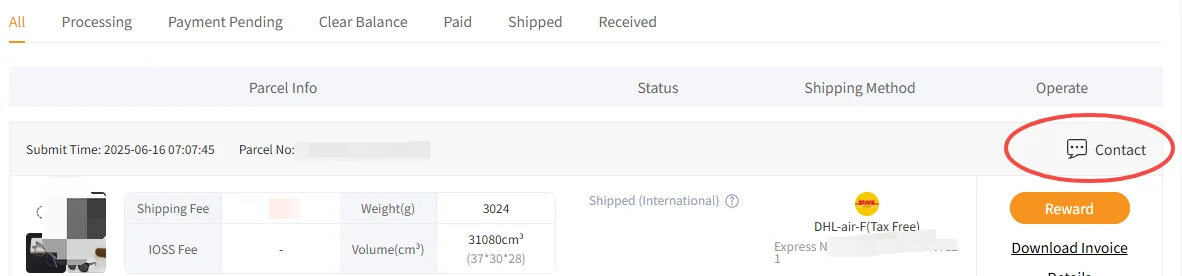
There is no inbox and no ticket queue to write into from the outside. Support is attached to the thing it is about: open the parcels page, find the parcel, and use Contact in its Operate column. For a problem with goods rather than with a parcel, the route is the order inside it, and the action is Apply for After-sales Service.
The filter strip above is more useful than it looks. Processing, Payment Pending, Clear Balance, Paid, Shipped and Received are the states a parcel moves through, and naming your state correctly in the first sentence of a message saves a round trip.
For anything that is not about a specific order, the help centre is the right door, and it can be read without an account.
The ten help-centre sections, and what each one is actually for
The operator organises its help centre by topic rather than by stage, which is efficient once you know the topics and baffling until then.
| Section | Open it when |
|---|---|
| Service & Fees | You want to know what is charged and for what, before any of it is charged. |
| Returns and Refunds | Goods are in the warehouse and you want them to go back. The five-day clock applies here. |
| Delivery Charges | The second bill is the question. |
| Packaging | You are deciding how a parcel is built. This site does not cover packing choices. |
| Customs and Taxation | You want to understand what happens at your own border, which is your country rule rather than the operator. |
| Receipt Information | Address, recipient and invoice details need changing or checking. |
| Warehouse & after-sale | Goods have arrived and something is wrong, or a parcel has been delivered and something is wrong. |
| Storage | The countdown on your warehouse listing is the worry. |
| Inspection Information | You want the scope itself rather than somebody reading of it. |
| Insurance and Compensation | Something is lost or damaged and you want to know what is covered. Read this before you buy anything fragile, not after. |
Two settings people change without reading what they do
Both live on the parcel submission page, one click apart.
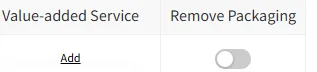
- Remove Packaging
A weight saving that costs you the return route
The switch is off by default. Turning it on asks for the packaging, labels or accessories to be taken off before the parcel is built.
The return terms exclude goods from which the customer has asked for exactly that. It is a real trade and it may well be worth making; it should just be made knowingly.
- Value-added Service
An Add link with consequences attached
Beside the switch sits a column headed Value-added Service with an Add link under it. What is on that menu is a packing question and this site does not cover packing.
What belongs here is only the warning: anything added there changes the parcel, and some changes to a parcel interact with the rules about what can still go back.
The vocabulary
A glossary, in the order you meet the words
Every term below appears somewhere in an ordinary order. They are listed in the sequence they turn up rather than alphabetically, because that is how you will need them.
| Word | What it means here |
|---|---|
| Spreadsheet | A site where products are gathered into browsable categories of cards. Not a document, not a file, and nothing to download. |
| Shopping agent | A company that buys an item you chose, from a seller you chose, and forwards it abroad. It is not the seller. |
| Quality inspection, QC | A basic appearance check carried out at the warehouse. Colour, large-area damage, stains, size, model and version number. |
| Image QC | The row on your warehouse listing carrying the inspection photographs, with icons to enlarge and to download them. |
| Stored in warehouse | The order state that starts the five-day return window. |
| Remaining Storage | The countdown shown beside a stored item, written as a number of days out of a total. |
| Mail Restriction | The class an item is sorted into for shipping. Common Goods is one such class. |
| Rehearsal Packing | A button on the warehouse listing, sitting beside Submit. A packing feature, and not one this site covers. |
| Submit | The press that moves selected goods off the warehouse listing and into a parcel. It closes your window for reading the photographs. |
| Clear Balance | A parcel status meaning there is an outstanding amount on it. |
| After-sales Service | The route for a problem found after delivery. Opened from the order inside the parcel. |
| Sealed | On the return standards, a seal applied by the manufacturer. Tape added by a seller or by the warehouse is not a seal. |
Frequently asked, including the awkward ones
Can this site help with my order?
No, and it is worth being blunt about it. This site has no access to any order, no account with the operator and no ability to look anything up. Everything here is a reading of published rules. Your order lives in your account, and the only people who can act on it are reachable from the row that order sits on.
Where do I ask a question before I have an order?
The help centre, which is readable without signing in: https://orientdig.com/help-center. It is organised by topic rather than by stage, so search it by the thing you are worried about.
Where do I ask about a specific parcel?
From the parcels page, on the row of the parcel itself. Contact sits at the end of that row, beside Download Invoice and Details.
Frequently asked, and rarely answered: how long does everything take?
This site does not publish timings, because the only honest figures are the ones the operator states and those are limits rather than estimates: purchasing hours of 09:00 to 18:00 UTC+8, a five-day return window from the moment goods are stored, and 72 hours after delivery. Anything else you read as a duration is somebody guessing.
Found a mistake on this site?
Please say so. Every rule quoted here carries the date it was read, and official pages change without announcing it. Corrections go to [email protected] and get made.